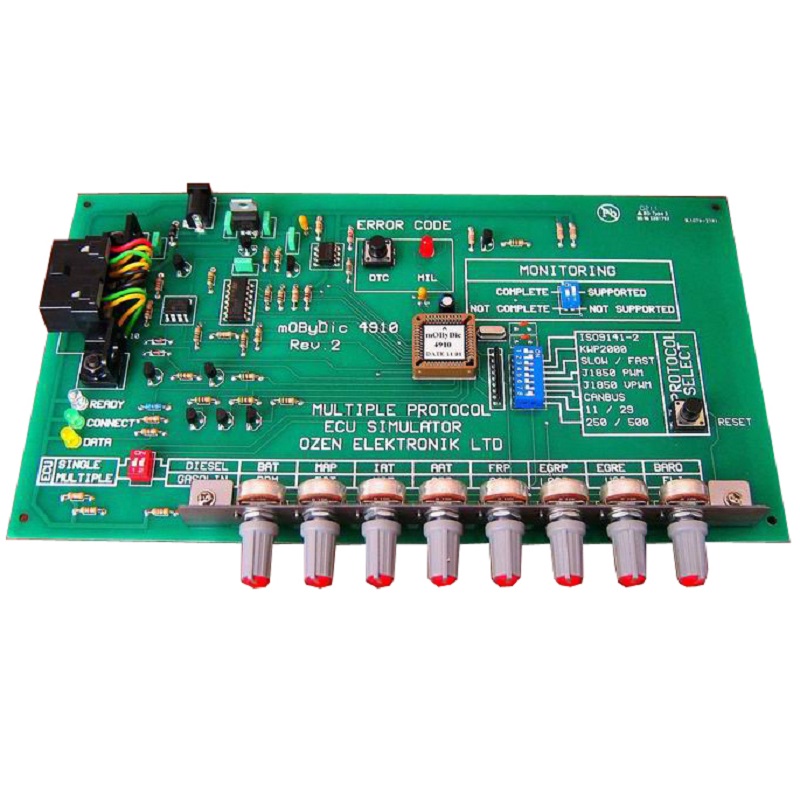
Multiple Protocol OBD ECU Simulator
Part No.: MPOZ-mOByDic4910
Multiple Protocol OBD ECU Simulator simulates 4 different ECUs according
Product Description
Description
The mOByDic 4910 goes a step beyond a single-ECU simulator: it can represent up to four separate vehicle control modules at once — Powertrain (PCM), Transmission (TCM), ABS, and Cluster Panel (HEC) — each responding independently to OBD requests with its own PIDs and diagnostic trouble codes. This makes it especially valuable for testing scan tools and diagnostic software against realistic, multi-module vehicle networks rather than a single simplified ECU.
Configuration is done entirely through onboard dip switches — no menu navigation or software required. Users select the protocol, choose gasoline or diesel PID sets, switch between single- or multi-ECU mode, and set monitoring/readiness status directly on the hardware. Eight potentiometers provide real-time control over key sensor values, and the unit is powered by a simple 12 VDC adapter for easy benchtop use.
Key Features
- Simulates a single ECU or 4 independent ECUs (PCM, TCM, HEC, ABS)
- Protocol selection via dip switch — no software configuration needed
- Selectable gasoline / diesel PID sets
- Advanced monitoring / readiness functions
- Generates DTCs independently for each simulated ECU
- 8 potentiometers for variable, real-time PID values
- Configurable VIN (Vehicle Identification Number)
- Simulates ISO9141-2, KWP2000, J1850 PWM, J1850 VPWM, and CAN
- Fully SAE-J1979 / ISO 15031-5 compatible
- Supports multiframe / multi-message operation
- Powered via 12 VDC power adapter
Module Legend
| Abbrevlation | Module |
|---|---|
| PCM | Powertrain Control Module |
| TCM | Transmission Control Module |
| ABS | Antilock Braking System |
| HEC | Cluster Panel Module |
How It Works
On power-up, an LED self-test sequence runs, then the Ready LED lights up to indicate the simulator is operational. The Connect LED confirms a successful protocol connection, the MIL LED blinks if no protocol is selected, and the yellow Data LED shows live communication with the connected OBD tester. Pressing the DTC button turns on the MIL LED and generates the configured trouble codes for each active ECU.
All configuration is done via onboard dip switches and buttons:
- Protocol Select — Chooses the active communication protocol. A reset button press is required after changing it; when multiple protocols are selected, ISO9141-2 takes top priority.
- Gasoline / Diesel Select — Switches the active PID set without requiring a restart.
- Single / Multiple ECU Select — In single mode, only the PCM responds to OBD queries; in multiple mode, all four ECUs respond independently.
- Monitoring / Readiness Select — Sets supported/complete status for all PCM monitoring bits simultaneously (PCM only).
- Reset Button — Performs a hardware reset, typically used after changing protocol.
- DTC Button — Triggers diagnostic trouble code generation, shown via the MIL LED.
Supported OBD Services
| Service | Function |
|---|---|
| Service 1 | Current emission-related data (live PIDs) |
| Service 2 | Freeze frame data |
| Service 3 | Emission-related diagnostic trouble codes |
| Service 4 | Clear/reset diagnostic information |
| Service 9 | Vehicle information (VIN, Calibration IDs) |
Simulated Parameters by Module
PCM (Powertrain) — Gasoline mode: RPM, engine load, vehicle speed (VSS), fuel level indicator (FLI), coolant temperature (ECT), mass air flow (MAF), accelerator pedal position (APP), oxygen sensor voltage (O2V)
PCM (Powertrain) — Diesel mode: Battery voltage (BAT), manifold absolute pressure (MAP), intake air temperature (IAT), ambient air temperature (AAT), fuel rail pressure (FRP), EGR position/error, barometric pressure (BARO)
TCM (Transmission): Vehicle speed sensor (VSS) only
ABS: Not intended to be OBD-compliant for live data; generates its own DTC
HEC (Cluster Panel): Vehicle speed, RPM, coolant temperature, fuel level, battery voltage
Independent DTC Generation per Module
| Module | Generated DTC(s) |
|---|---|
| PCM | P0100, P0101, P0102 |
| TCM | B0200, B0201 |
| ABS | C0300 |
| HEC | U0400 |
Applications
- Bench validation of multi-module OBD-II / EOBD scan tools
- Testing diagnostic software against realistic multi-ECU vehicle networks
- Multiprotocol compatibility testing (ISO9141-2, KWP2000, J1850 PWM/VPWM, CAN)
- Training platforms for automotive network diagnostics
Note:
2. EOL products will not be notified separately.
3. Product images are for reference only. Actual products may vary depending on the version or specifications.
4. Product information, specifications, and availability are subject to confirmation at the time of order.