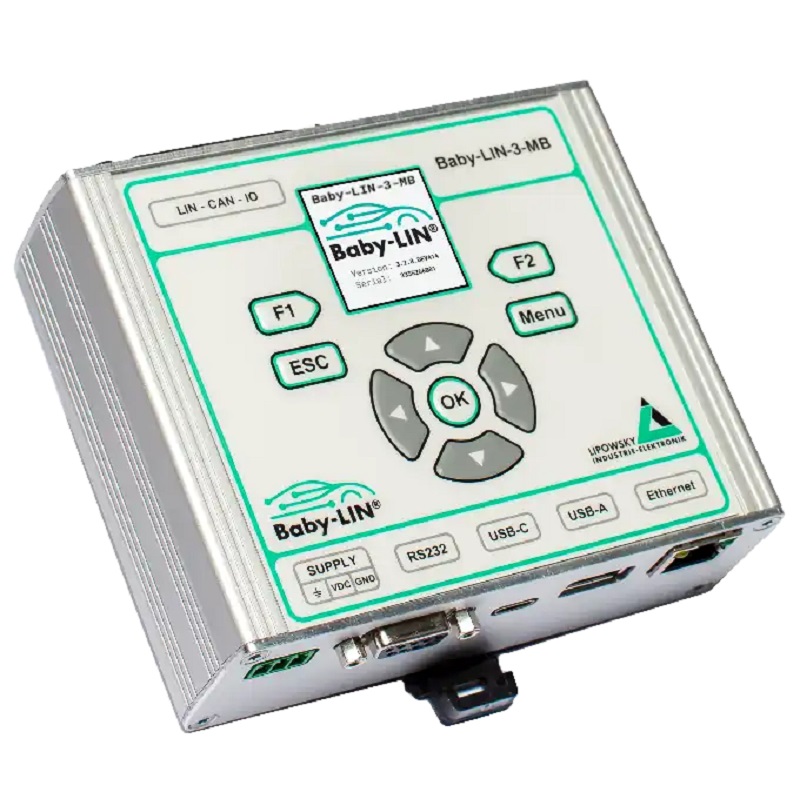
Baby-LIN-3-MB
Part No.: MPLPS-Baby-LIN-3-MB
Multibus simulation device with multi interface options, integrated keypad and display
Product Description
Description
The Baby-LIN-3-MB is a modular Ethernet/RS-232 to LIN and CAN Bus gateway that allows LIN or CAN Bus driven ECUs to be controlled from any host, such as a PLC, equipped with RS-232 or Ethernet.
The base version of the Baby-LIN-3-MB is delivered with:
- 1 x LIN Bus interface
-
Up to 7 x digital inputs and 5 x digital outputs:
- 3 x Low-Speed inputs
- 4 x PWM High-Side outputs and inputs, with input and output combined on three channels, including current measurement
- 1 x isolated switch contact
- 2 x High-Speed USB ports (USB-A and USB-C)
- 1 x Gigabit Ethernet port
- 1 x RS-232 port
- 1 x 1.54" TFT display and keyboard
Additional Hardware Requiring Activation Codes (1)
- 1 x additional LIN Bus interface
- 2 x High-Speed CAN Bus interfaces with CAN FD capability and integrated switchable termination resistors
The device and I/O power supply is also suitable for 48 V board systems.
The LIN and CAN Bus configurations are defined in a custom SDF. The process can be controlled using a simple ASCII command protocol issued via the built-in RS-232 or Ethernet interface.
A Linux-based host CPU allows easy adaptation of network protocols and remote support options.
A modern web interface is available through any browser when the device is connected to the local network. It provides, among others, the following features:
- Information about the installed components
- Easy upload and deletion of SDFs
- View and edit the system configuration
- Upload, deletion and download of SDFs
- User permission management
- Easy access to and download of log files
- Firmware updates
Multiple SDFs can be stored on the internal flash drive. At least 1 GB of the 4 GB flash drive is reserved for user-specific SDFs.
The integrated 1.54" display and button keyboard can be used for easy on-site configuration of network parameters or SDF selection.
Both USB 2.0 host interfaces support USB drives and USB card readers formatted with FAT or exFAT.
Furthermore, the USB-C connector can be used to extend the Baby-LIN-3-MB with other devices from the Baby-LIN-3 family. (3)
An integrated UPS (Uninterruptible Power Supply) allows the system to shut down safely during power failures or remain operational during short power drops.
The Baby-LIN-3-MB features internal ports for up to 2 extension interfaces. These extension ports (ExPORT) allow the device to be modularized to meet widely varying requirements, such as up to 6 independent LIN Bus interfaces.
The following module is currently available:
- BL-MB-ExPORT-LIN: Adds 2 additional LIN Bus interfaces and 2 digital I/O interfaces. Up to 2 ExPORT-LIN modules can be installed per Baby-LIN-3-MB. (4)
More ExPORT interfaces are under development and are not yet available for purchase. Custom ExPORT interface configurations are available upon request.
The device firmware is field-updatable, allowing the device to easily adapt to changes in bus specifications and upcoming new system features.
The Baby-LIN-3-MB supports SDF-V3 and is prepared for SDF-V4.
Operation Mode
Any situation that requires communication with a LIN or CAN Bus device is a potential field of application for the Baby-LIN-3-MB. It is a versatile tool that can be used in research laboratories, test departments and production environments (EOL applications).
The Baby-LIN-3-MB supports different applications and provides three dedicated operating modes to meet user requirements:
PLC Mode
Program and store freely programmable command sequences in the Baby-LIN-3-MB to operate it without the need for a PC.
This allows a bus-driven ECU to be operated during durability testing or EOL applications without a connected PC.
SimpleMenu Mode
Control the bus via the LINWorks software or customer-specific applications using the Baby-LIN-DLL.
TestRun Mode
Designed for endurance and long-term testing and logging, with an optional user-configurable GUI available through the web interface and more restrictive user management.
This mode enables true stand-alone operation without the need for additional devices.
The new user management system allows groups of users to be created through the web interface. Different permissions can be assigned to each group, such as enabling or disabling SDF upload/download, access to system settings, or operating mode changes.
LINWorks Suite
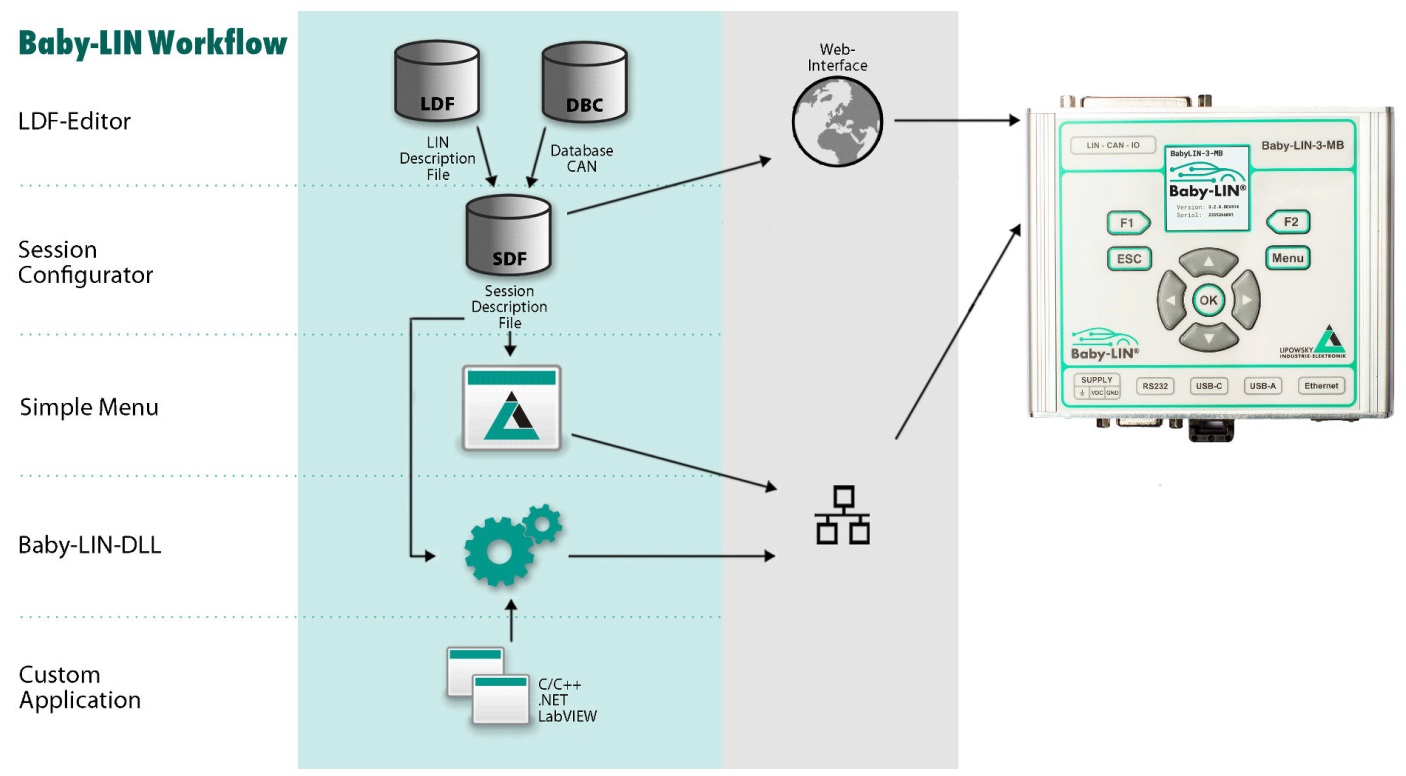
The purchase of a Baby-LIN-3-MB includes a license to download the LINWorks suite. This suite is a collection of PC software that supports you throughout the entire workflow.
LDFEdit allows the inspection, creation and editing of an LDFile (LIN Description File).
SessionConf allows the inspection, creation and editing of an SDFile (Session Description File), and supports importing LDF files for LIN Bus simulation and DBC files for CAN Bus simulation. It defines everything required for a complete simulation of each available bus, such as which nodes are available on each bus and which nodes should be simulated by the Baby-LIN-3-MB. It also allows application logic to be defined. This programming capability is available for each device out of the box.
SimpleMenu is used to establish a connection to the Baby-LIN-3-MB, upload SDF files, change the device target configuration, control the bus, and monitor frames and signals on the bus. Even without an LDFile, DBC file or SDFile, the bus can be monitored and frames can be logged.
Baby-LIN-DLL allows customers to create their own applications and use all features of the Baby-LIN-3-MB, such as controlling and monitoring the LIN Bus and CAN Bus interfaces. Baby-LIN-DLL is a native C/C++ DLL and is available for Windows, Linux and Raspberry Pi. Wrappers for .NET, Python, VB6 and LabVIEW are also available. Examples are provided for all supported programming languages.
LogViewer can display and convert log files generated by the Baby-LIN-3-MB and SimpleMenu.
The LINWorks software runs on 32-bit and 64-bit versions of Windows 10 and higher.
Specifications
Device
- Power supply: 8-50 VDC via 3-pin connector (MC 1,5/3-ST-3,81)
- Galvanic isolation of the communication interfaces from the power supply
- CPU: 650 MHz dual-core ARM Cortex-A7 with 512 MB RAM for the Linux system and host applications, plus 480 MHz Cortex-M7 for communication and I/O
- Integrated membrane keyboard with 9 keys
- 1.54" IPS color display with 232 x 232 pixel resolution
- High-precision RTC (real-time clock) with backup battery
- Typical current consumption: 200 mA @ 24 VDC
- Integrated UPS (uninterruptible power supply) to prevent data loss
Interface: LIN
- Up to 6 LIN Bus interfaces available
- 1 x LIN Bus interface available by default
- 1 x LIN Bus interface optionally available on the hardware but not activated; voucher code required (1)
- 4 x LIN Bus interfaces available through hardware modules; additional hardware extensions required (4)
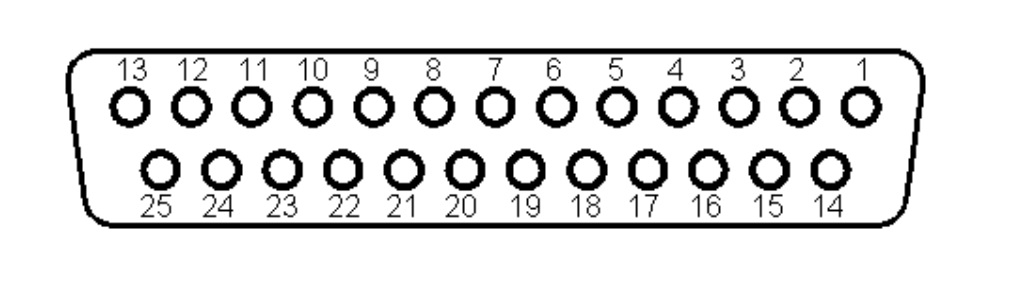
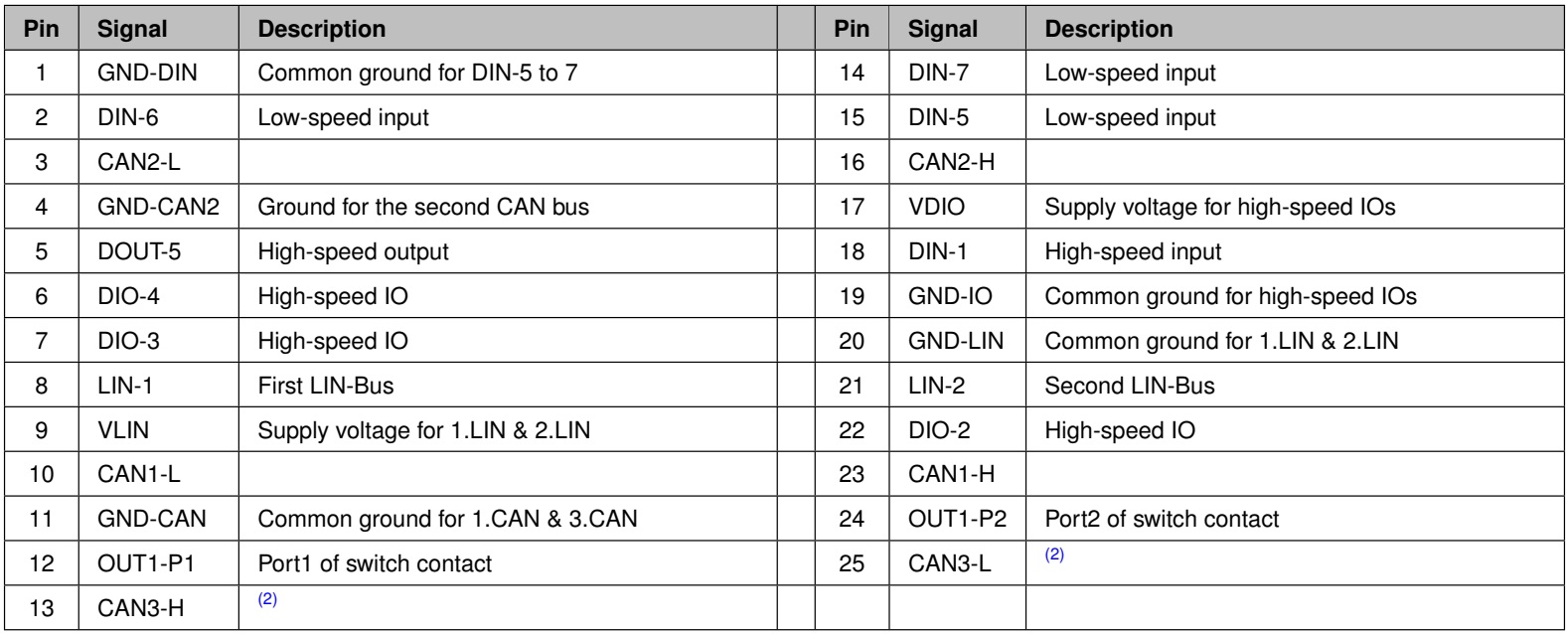
- LIN Bus connection via 25-pin Sub-D connector; extensions use their own SUB-D9 connectors
- LIN Bus supply voltage: 8-26 VDC
- LIN Bus baud rate: up to 115200 Baud, including support for protocols outside the LIN specification
- Supported LIN versions: V1.2 to V2.2
- Supported LIN-related protocols: Cooling and SAE J2602
- Internal switchable 1 kOhm resistor for Master node emulation
- Maximum signal cable length for LIN Bus: 30 m
Interface: CAN
- 2 x CAN-HS Bus interfaces according to ISO 11898 with up to 1 Mbit/s, available on the hardware but not activated; voucher codes required
- Upgradeable to CAN FD Bus according to ISO 11898-1:2015 with data baud rates up to 8 Mbit/s; voucher codes required
- Internal switchable 120 Ohm termination resistor for each interface
- The second CAN Bus is galvanically isolated from the other two buses and the rest of the system
- Maximum signal cable length for CAN Bus: 30 m
- Interface: Low-Speed Digital I/O
- 3 x digital inputs
- Input voltage: 5-60 V
- Galvanically isolated from the rest of the system
- 1 x electrically isolated solid-state switch, max. 32 V, max. 190 mA
Interface: High-Speed Digital I/O
- 4 x high-speed digital inputs and High-Side outputs; on 3 channels, the input and output are combined
- PWM frequencies up to 20 kHz with 0.1% duty-cycle steps (5)
- Galvanically isolated from the rest of the system with a dedicated power supply
- Supply voltage: 7-50 V; outputs alone can operate with as low as 1 V
- Maximum current: 2.2 A for all four outputs or for a single output
- Current measurement for the combined output current: 10-bit resolution, 3% accuracy
Interface: USB Host
- 2 x USB 2.0 High-Speed interfaces via one USB-A and one USB-C connector
- Maximum current per port: 500 mA
- Supported file systems: FAT-32, FAT-16 and exFAT
- USB-C can be used to add additional Baby-LIN-3 devices (3)
Interface: Ethernet
- Ethernet via RJ-45 connector
- Transfer rate: 10/100/1000 Mbit/s
- Auto MDI-X feature
- Command protocol: TCP/IP socket on port 10002
- Web interface for device events, system information and easy SDF upload
- EEE (Energy Efficient Ethernet) support
Interface: RS-232
- Serial connection via female Sub-D9 connector
- Data rate: 9600 Baud (default) to 115.2 kBaud
- Data format: 8-N-1
Case
- Degree of protection: IP20
- Operating temperature: -20°C to +60°C
- Weight: 410 g
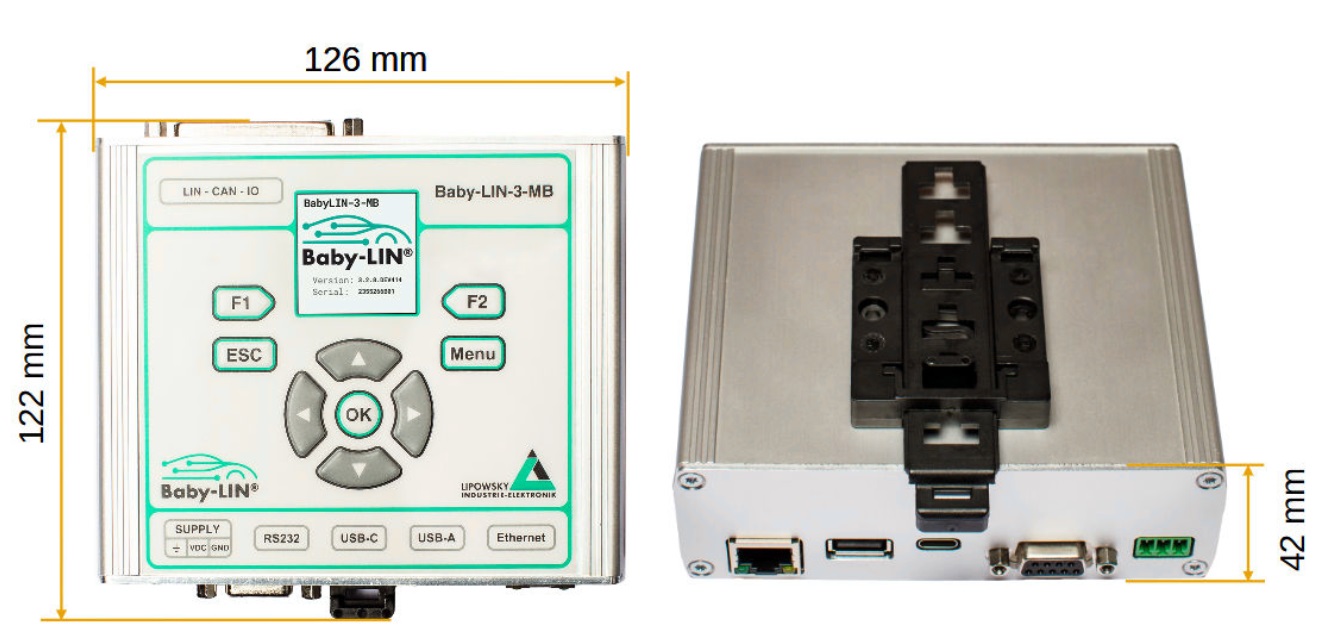
- Case dimensions [mm]: 126 x 122 x 42 (L x W x H)
- Mounting: Top-hat rail (TS 35)
Pin Description
Notes
- This function requires additional software license(s). See the Ordering Information for more details.
- The third CAN Bus interface is available in the hardware, but is not supported yet. Please check our homepage for the latest information.
- This function is implemented but is not available yet. Please check our homepage for the latest information.
- The BL-MB-ExPORT-LIN is available as an upgrade or can be installed directly at the factory. Please see the Ordering Information for details.
- PWM input functionality will not be available at launch and will be provided through an update two or three weeks later. The PWM outputs and standard input functionality will work as intended.
Dimension Drawing
Hardware Requirements
The following hardware is required to operate the Baby-LIN-3-MB:
-
A PC with about 200 MB of free hard drive space
- Required for the installation of the LINWorks software. Please check the software requirements and applicable use cases.
-
A free COM port
- Required only if the Baby-LIN-3-MB is controlled using the ASCII command protocol via the RS-232 interface.
-
Access to the local network
- Required only if the Baby-LIN-3-MB is controlled using the ASCII command protocol via the Ethernet interface, or if it is controlled using SimpleMenu or Baby-LIN-DLL.
-
Power supply: 8-50 VDC, min. 2 A
- Required to supply power to the Baby-LIN-3-MB.
Software Requirements
The LINWorks software requires one of the following operating systems:
- Windows 10 (32-bit and 64-bit)
- Windows 11 (x86 and 64-bit)
LINWorks workflow
Scope of Delivery
The delivery of a Baby-LIN-3-MB system includes the following components:
- Baby-LIN-3-MB device
- 1 x 3-pin plug with screw connection (MC 1,5/3-ST-3,81)
- Download license for the LINWorks Suite, including LINWorks PC software, USB driver, example files and documentation
Ordering information
| Item Number | Item | Description |
|---|---|---|
| 8001060 | Baby-LIN-3-MB | Multibus simulation device with multi-interface options. Features 1 LIN channel. |
| 8001071 | Baby-LIN-3-MB-4L | Same as Baby-LIN-3-MB, but with the 2nd LIN option and one installed ExPORT-LIN, increasing the total number of LIN channels to 4 LIN Buses. Also adds 2 additional Digital I/Os to the base version. |
| 8001072 | Baby-LIN-3-MB-6L | Same as Baby-LIN-3-MB-4L, but with a second ExPORT-LIN, increasing the total number of LIN channels to 6 LIN Buses. Also adds 4 additional Digital I/Os to the base version. |
| 8001073 | Baby-LIN-3-MB-3L | Same as Baby-LIN-3-MB-4L, but without the pre-installed option code for the 2nd LIN channel, for a total of 3 LIN Buses. |
| 8001074 | Baby-LIN-3-MB-5L | Same as Baby-LIN-3-MB-6L, but without the pre-installed option code for the 2nd LIN channel, for a total of 5 LIN Buses. |
Optional
Hardware Components
| Item Number | Item | Description |
|---|---|---|
| 3021303 | MC1,5/3-ST-3,81 | 3-pin plug component with screw connection and tension sleeve. Cable outlet parallel to the plug-in direction. Screw direction perpendicular to the plug-in direction. |
| 3040100 | Male SUB-D25 Plug | SUB-D25 male plug with solder cups. |
| 8003030 | Upgrade BL-MB-ExPORT-LIN | Upgrade a device with one additional ExPORT-LIN module to add 2 LIN channels and additional Digital I/O. This upgrade can be ordered twice to create a 6-LIN-channel version. The device must be sent back to us or one of our distributors for the upgrade. |
Voucher Codes
| Item Number | Item | Description |
|---|---|---|
| 8002150 | Option BL-Security-Access-Gateway | License code for the Security Access Gateway Application to connect Security DLLs to SDFs executed on a Baby-LIN-3-MB. |
| 8000891 | Option BL-Webasto KLine | License code to activate the special function for the Webasto K-Line Protocol. Written approval from Webasto is required. |
| 8000853 | Option BL-LIN-2 | License code for the Baby-LIN-3-MB to activate the second LIN Bus interface. |
| 8000810 | Option BL-CAN-1-HS | License code for the Baby-LIN-3-MB to activate CAN-HS (High-Speed) support for the first CAN Bus interface. |
| 8000991 | Option BL-CAN-1-FD | License code for the Baby-LIN-3-MB to activate CAN FD (Flexible Data Rate) support for the first CAN Bus interface. |
| 8000990 | Option BL-CAN-2-HS | License code for the Baby-LIN-3-MB to activate CAN-HS (High-Speed) support for the second CAN Bus interface. |
| 8000992 | Option BL-CAN-2-FD | License code for the Baby-LIN-3-MB to activate CAN FD (Flexible Data Rate) support for the second CAN Bus interface. |
Software Components
| Item Number | Item | Description |
|---|---|---|
| 9004210 | Customer-Specific Installation | Installation of a customer-specific SDFile version and/or installation of a license activation key. |
| 9103010 | LINWorks CD | LINWorks archive containing PC software for all Baby-LIN products on physical media (CD). |
Note:
2. EOL products will not be notified separately.
3. Product images are for reference only. Actual products may vary depending on the version or specifications.
4. Product information, specifications, and availability are subject to confirmation at the time of order.