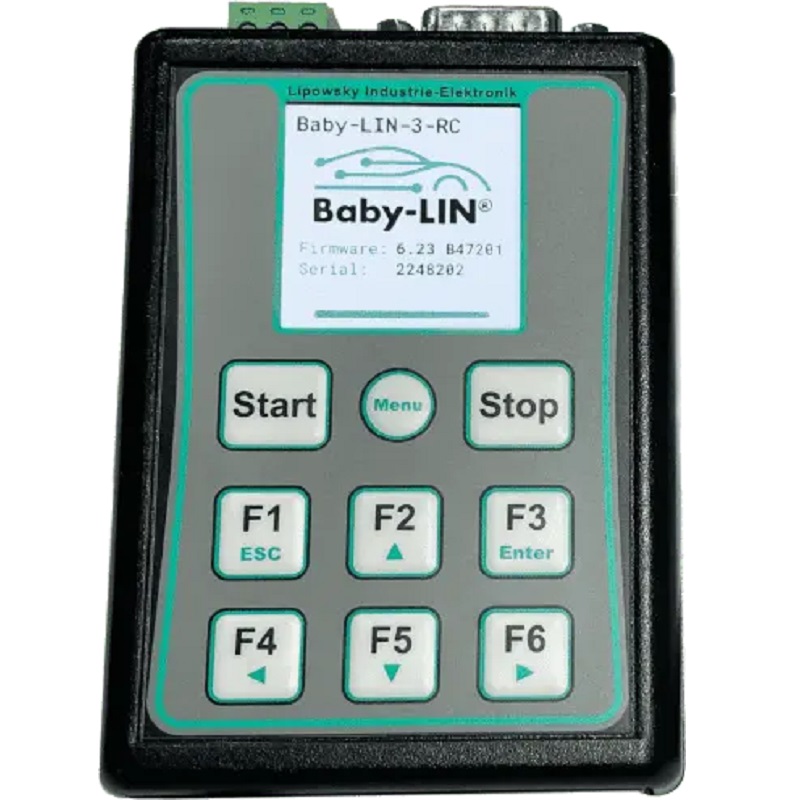
BABY-LIN-3-RC
Part No.: MPLPS-BABY-LIN-3-RC
LIN-Bus simulation device with integrated keypad and display
Product Description
Description
The Baby-LIN-3-RC is part of the third generation of Baby-LINs introducing new and more powerful features.
All devices are powered by a 480MHz Cortex M7 core increasing the possible speed by 60% in comparison to the previous generation, allowing faster SDF execution and leaving reserves for new software features. To emphasize this performance leap the devices are also now equipped with a native high-speed (480MBit/s) USB connection and a USB-C connector, making it more convenient and reliable to use. We also further improve the usability of our devices by offering a male SUB-D9 connector for all bus signals, allowing the user to secure the connector to the device and giving more flexibility for upgrades from one device to another. Of course, we are upholding our compatibility guidelines for previous generations so all devices have still the established three pin plug for the LIN bus.
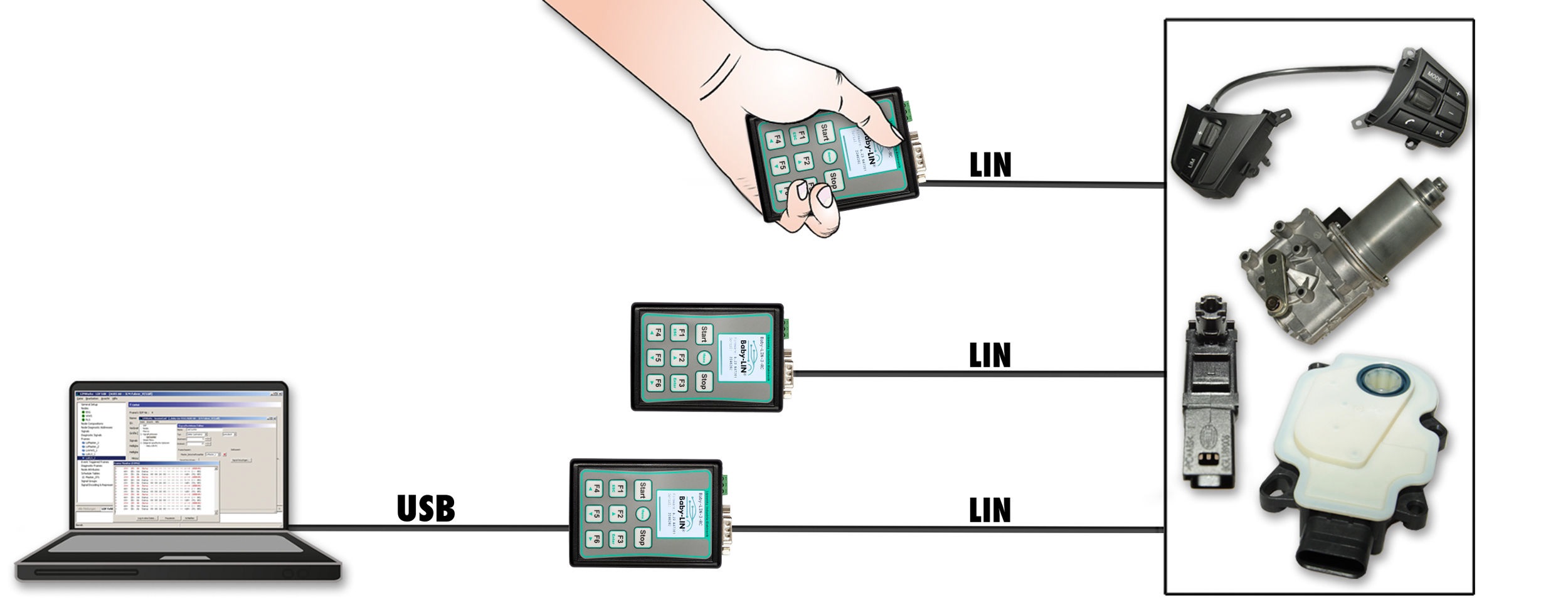
The power for the Baby-LIN-3-RC can be supplied either from the USB or the LIN-Bus side. If the device is powered by the LIN-Bus it can be operated without the need for a PC. All communication interfaces (LIN-Bus and USB) are galvanic isolated, eliminating interference between the PC and the board electronics.
The Baby-LIN-3-RC allows controlling LIN-Bus equipped devices by using a standard personal computer. After installation of the supplied LINWorks software, you can connect the Baby-LIN-3-RC to a free USB port, and access the LIN-Bus devices via LINWorks or custom programs by using the Baby-LIN-DLL.
Two red/green colored LEDs on the side show device information but can also be utilized by the user for other needs.
The Baby-LIN-3-RC has an integrated membrane keyboard with 9 keys and a 1,54" ISP color display with 240x240 pixels. Thus, it is usable as an autonomous remote control for the bus. Each of the six function button can be assigned to any commands, the dedicated bigger Start and Stop key allow for quick execution of macros or other functions. Using two keys as SHIFT-keys extends the usable number of six keys up to twelve. The ninth buttons is dedicated to enter or leave the menu of the device to show information, edit features of the device and more.
All this is shown on the new display. An easy to use GUI editor will be implemented in the LINWorks so users can show elements like bus signals or macro results directly on the screen.
The device firmware is field updateable, so the changes of bus specification or upcoming new system features can be adapted easy.
The Baby-LIN-3-RC supports SDF-V3 and is prepared for SDF-V4.
Operation mode
Any situation that requires communication with a LIN-Bus device is a potential field of application for a Baby-LIN-3-RC . It is a versatile tool that can be used in research laboratories, test departments and production (EOL applications).
- Monitor and log all frames on the bus without the need for a SDF. If a SDF is available signal values can also be monitored.
- Control the bus via the LINWorks software or customer specific applications by using the Baby-LIN-DLL.
- Program and store free programmable command sequences in the Baby-LIN-3-RC to run it as a stand-alone device without the need for a PC. Thus you can run a bus driven ECU in a durability test or EOL applications without any PC connected.
Simulation modes
The Baby-LIN-3-RC is able to simulate different configurations of LIN-Bus nodes. It is possible to simulate any number of nodes ranging from none to all. These are some typical configurations:
- Simulate the LIN-Bus master to operate slave nodes.
- Simulate any number of LIN-Bus slave nodes.
- Simulate all nodes and therefor the complete communication on the bus.
- Simulate all but one node and realize a residual bus simulation.
- Simulate no node to monitor the bus communication only.
LIN-Bus properties
The used LIN driver supports bus voltages of 8-26 VDC and can be used up to 115200 Baud. That way even nodes that operate outside the standard limits of the LIN specifications can be controlled with the Baby-LIN-3-RC .
Supported LIN-versions are V.1.2 to V.2.2. The pull-up resistor of the LINBus driver is internally switched to 1 kOhm, if the master node is emulated.
LINWorks suite
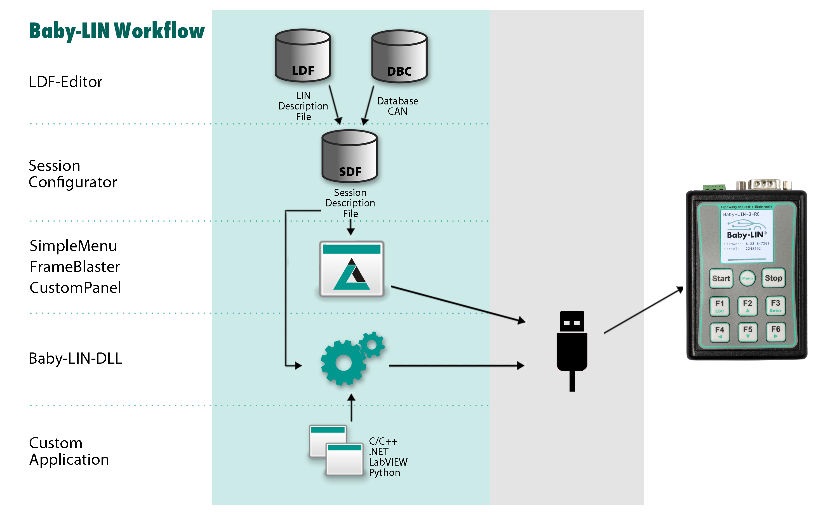
The purchase of a Baby-LIN-3-RC includes the license to download the LINWorks suite. This suite is a collection of PC software that supports you during the whole workflow. The LDFEdit allows the inspection, creation and edit of a LDFile (LIN Description File).
The SessionConf allows the inspection, creation and edit of a SDFile (Session Description File) and features a file import for LDFiles (for LINBus simulation). It defines everything needed for a complete simulation of each available bus, e.g. which nodes on each bus are available and which nodes should be simulated by the Baby-LIN-3-RC . Moreover it allows defining an application logic. This programming ability is available for each device out of the box.
The SimpleMenu is used to establish a connection to the Baby-LIN-3-RC and upload SDFiles, change the device target configuration, control the bus and monitor the frames and signals on the bus. Even without a LDFile or SDFile the bus can be monitored and the frames can be logged.
The Baby-LIN-DLL allows customers to create their own application and use all features of the Baby-LIN-3-RC like controlling and monitoring the LIN- and CAN-Bus interfaces. The Baby-LIN-DLL is a native C/C++ DLL. It is available for Windows, Linux and RaspberryPi. Wrapper for NET, Python, VB6 and LabView are available. Of course we provide examples for all supported languages.
The LogViewer can show and convert the log files of the Baby-LIN-3-RC as well as the SimpleMenu.
The LINWorks software runs on 32 and 64 bit Windows 10 or higher versions.
Specifications
Device
- Power supply: 8-26 VDC
- Power supply via 3 pin connector (MC 1,5/ 3-ST-3,81) or male SUBD9 connector
- Galvanic isolation of the communication interfaces and USB plug side
- CPU: ARM Cortex-M7, 480 MHz
- Memory: 1 MB RAM
- Integrated membrane keyboard with 9 keys
- 1,54" IPS color display with 232x232 pixel resolution
Interface: USB Device
- USB 2.0 high-speed (480Mbit/s) interface
- Connection via USB-C plug
Interface: LIN
- 1 LIN-Bus interface available
- 1 Red/green LED (LED1) to show state of the LIN-Bus and the supply voltage
- LIN-Bus connection via 3 pin connector (MCVR 1,5/ 3-ST-3,81) or SUB-D9 connector
- LIN-Bus supply voltage: 8-26 VDC
- LIN-Bus baud rate: up to 115200 Baud (Support of protocols outside of the LIN specification)
- Supported LIN versions: V1.2, V1.3,...V2.2
- Supported LIN related protocols: Cooling and SAE J2602
- Maximum signal cable length for LIN-Bus: 30 m
Case:
- Degree of protection: IP20
- Operating temperature: -20°- +60°Celsius
- Weight: 110 g
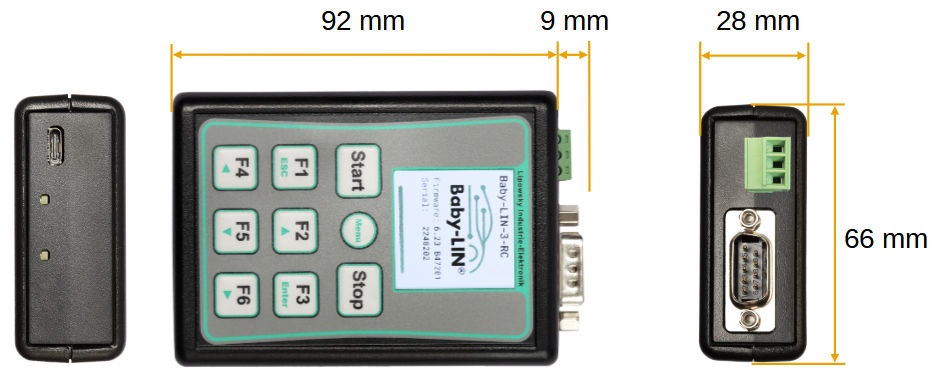
- Case dimensions [mm]: 92 x 66 x 28 (L x W x H), external connectors not included.
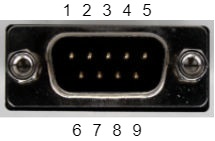
Pin Description
| Pin | Signal | Description |
|---|---|---|
| 1 | n.c. | no connection, leave unconnected |
| 2 | n.c. | no connection, leave unconnected |
| 3 | n.c. | no connection, leave unconnected |
| 4 | 1.LIN | First LIN-Bus |
| 5 | n.c. | no connection, leave unconnected |
| 6 | GND | Common ground |
| 7 | n.c. | no connection, leave unconnected |
| 8 | 1.LIN | First LIN-Bus |
| 9 | VCC | Supply input for the device |
Dimension Drawing
Hardware Requirements
The following hardware is required to operate the Baby-LIN-3-RC :
A PC with about 200 MB free hard drive space
- Required for the installation of the LINWorks software. Please check the software requirements and use cases.
A free USB port
- Required to transfer SDFiles to the Baby-LIN-3-RC and for firmware updates.
Software requirements
The LINWorks software requires one of the following operating systems:
- Windows 10 (32 and 64 Bit)
- Windows 11 (x86 and 64 Bit)
LINWorks workflow
Scope of delivery
The delivery of a Baby-LIN-3-RC systems includes the following components:
- Baby-LIN-3-RC device
- USB-C 2.0 cable, 1m, Type A to type C
- One 3-pin plug with screw connection (MC 1,5/3-ST-3,81)
- One SUB-D9 female plug with solder cups
- Download license for the LINWorks Suite (includes LINWorks PC software, USB-driver, example files and documentations)
Ordering Information
| Item Number | Item | Description |
|---|---|---|
| 8001024 | Baby-LIN-3-RC | LIN-Bus simulation device with integrated keypad and display |
Optional
Hardware Components
| Item number | Item | Description |
|---|---|---|
| 3500720 | USB 2.0 cable, 1m Type A to type C | This cable connects the Baby-LIN-3 to a PC. |
| 3021303 | MC1,5/3-ST-3,81 | 3-pin plug component, screw connection with tension sleeve. Cable outlet parallel to plugin direction. Screw direction vertical to plugin direction. |
| 3040330 | Female SUB-D9 plug | SUB-D9 female plug with solder cups to connector the male SUB-D9 plug of the Baby-LIN-3. |
Voucher Codes
| Item number | Item | Description |
|---|---|---|
| 8002150 | Option BL-Security-Access-Gateway | License code for the Security Access Gateway Application to connect Security DLL's to SDF executed on a Baby-LIN-3-RC . |
| 8000891 | Option BL-Webasto KLine |
License code for software activation of special function of Webasto K-Line Protocol, need
a written approval of Webasto.
|
Software Components
| Item number | Item | Description |
|---|---|---|
| 9004210 | Customer specific installation | Installation of customer specific SDFile version and/or installation of license activation key. |
| 9103010 | LINWorks CD | The LINWorks archive with PC software for all Baby-LIN products on a physical medium (CD). |
Note:
2. EOL products will not be notified separately.
3. Product images are for reference only. Actual products may vary depending on the version or specifications.
4. Product information, specifications, and availability are subject to confirmation at the time of order.